ATO

Automated Task Optimization

ATO automates the repetitive work.

ATO is a Vietnamese startup building automation software for small and mid-sized teams. Build workflows by drag and drop, run them on a schedule, watch them live and pay only for what you use. Next, we are bringing a team of AI agents into the code editor.

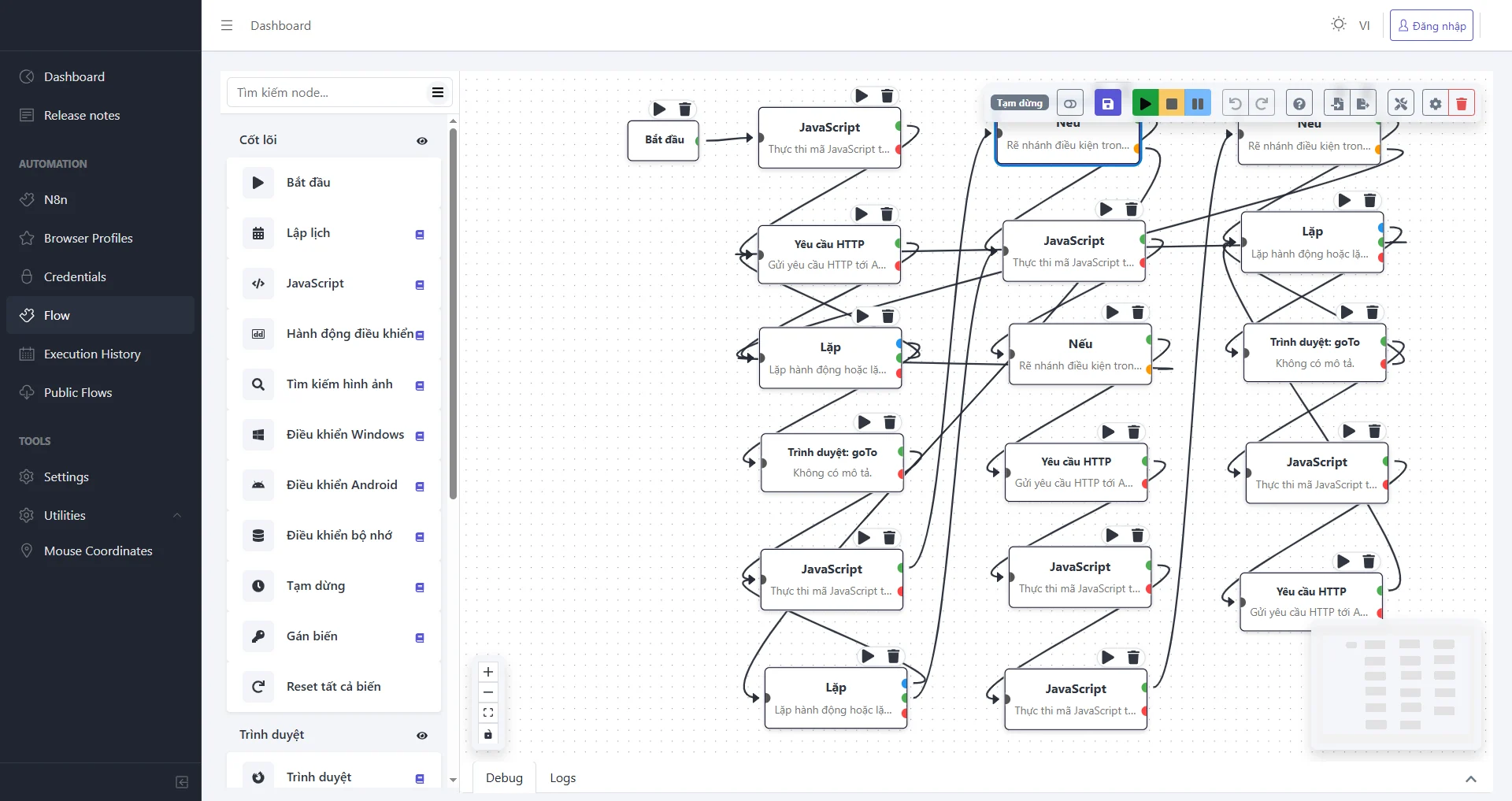
workflow-app v1.5.7 · Flow editor
ATO Workflow App flow editor: a node palette on the left and a canvas of connected HTTP request, If, Loop, JavaScript and Browser goTo nodes, with run, stop and pause controls.

Products

Two products, one ecosystem.

ATO Workflow App is live with users today. Agent Team IDE is our next product, now in private development.

ATO Workflow App flow editor
Live · v1.5.7

ATO Workflow App

A desktop app for building and running automated workflows. One flow can drive a web browser, Windows applications and Android devices, call HTTP APIs and run JavaScript, with branching, loops and variables.

  • Drag-and-drop flow editor with success and error ports on every node
  • Scheduling and an execution history that updates in real time
  • Isolated browser profiles, shared public flows and built-in n8n
See the app
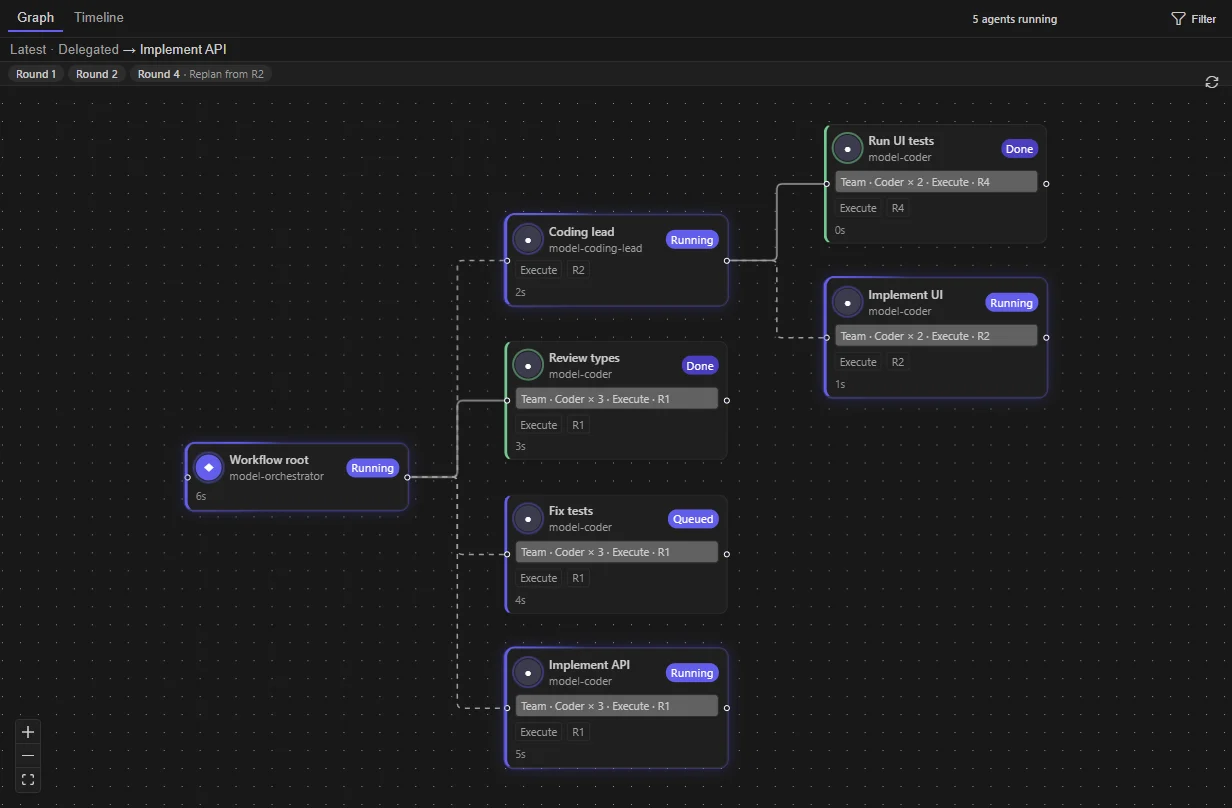
Agent Team IDE workflow graph of delegated agents
Coming soon

Agent Team IDE

A Windows IDE with a built-in team of AI agents. The Orchestrator plans the work and delegates to a researcher, coder, tester and reviewer, behind approval gates enforced by a local Gateway.

  • Create a whole agent team from one template
  • Watch every agent on one graph; stop or steer while it runs
  • Agents ask before they change files or run commands
Learn more
Live · v1.5.7

ATO Workflow App

Drop nodes on a canvas, connect them, and you have a workflow.

Each node is one step: open a page, click inside a Windows app, find an image on screen, send an HTTP request or run JavaScript. Nodes have separate success and error outputs, so a flow can recover when something fails.

  • Start
  • Schedule
  • JavaScript
  • If
  • Loop
  • HTTP request
  • Browser
  • Image search
  • Windows control
  • Android control
  • Set variable
  • Wait

Run a single node or the whole flow, pause midway, undo, import and export flows, and read the Debug and Logs panels under the canvas.

Node palette
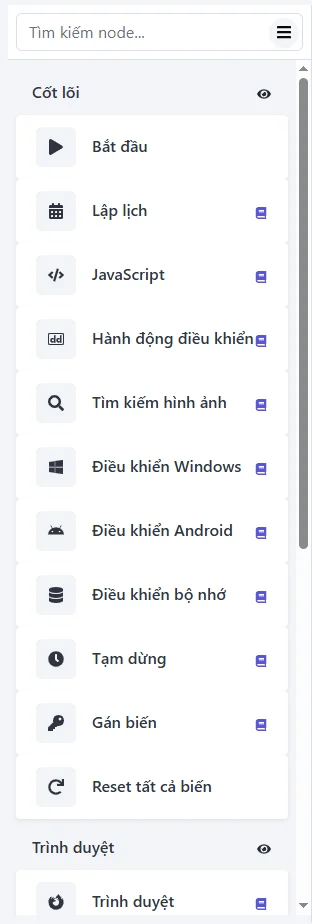
Node palette, Core group: Start, Schedule, JavaScript, Control action, Image search, Windows control, Android control, Memory control, Wait, Set variable, Reset all variables; Browser group below. The production UI is in Vietnamese.
Production build, Vietnamese UI.

Run, schedule and share

  • Flow list with status, public flag and one-click Run
  • Execution history for manual and scheduled runs, filterable by flow, type and time
  • Public flows that other users install with one button
  • Browser profiles with their own user agent, proxy, folder and extensions
  • Built-in n8n: install and auto-start n8n from inside the app
  • Reliability: health checks, auto-restart on failure, start with Windows
Automation flows
Flow list table with name, description, status, public, created date and Edit, Run, Public, Delete actions.
Public flows
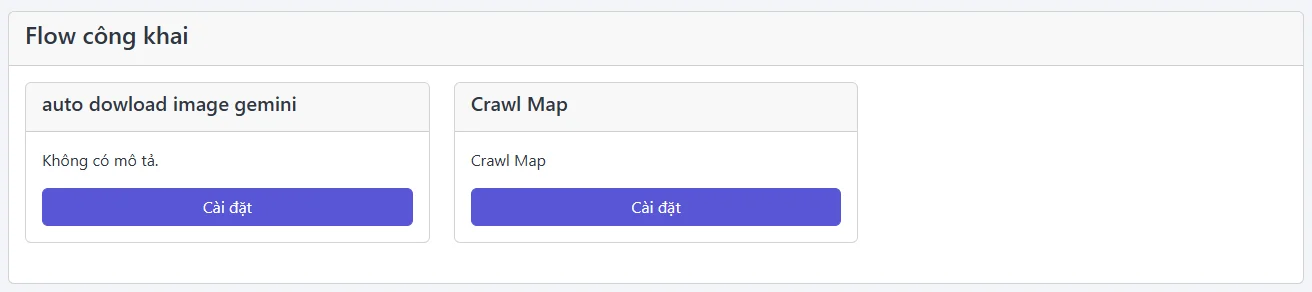
Public flows page with installable flow cards.

Web platform

The app runs on your machines; you coordinate on the web.

Real-time control plane

Every desktop client connects to the web portal over WebSockets: live job progress, remote commands and alerts across many machines, without page reloads.

Usage-based wallet

Customers top up in VND and spend credits per workflow run or paid feature, with a clear transaction history.

Markdown docs

Write, preview and publish Markdown documents as share links, so teams can document their processes next to their workflows.

Coming soon

Agent Team IDE

A team of AI agents working inside your editor.

Give the Orchestrator a goal. It splits the work across a planner, coder, tester and reviewer, and you watch every agent run on one graph. Agent Team IDE is a Windows x64 IDE built on Code-OSS with a bundled OpenClaw Gateway.

Agent Workflow · Graph · 5 agents running
Agent Workflow panel: the workflow root delegates to Coding lead, Review types, Fix tests and Implement API; Coding lead delegates further to Run UI tests and Implement UI. Each node shows Running, Queued or Done.
Screenshots from a pre-release build.

Set up a whole team in one step

The SE Team template creates an Orchestrator, researcher, coder, tester and reviewer. Each role has its own role contract, skills and AGENTS.md. The team can share the Orchestrator's connection, or each agent can use its own endpoint and model. Agents can also run through a CLI agent such as Claude Code.

  • Preview the plan before any agent is created
  • Roles & Rules, Project Rules and Skills per workspace
  • Memory, Codebase Index and Automations on the same settings screen
Agent Team Settings · Agents
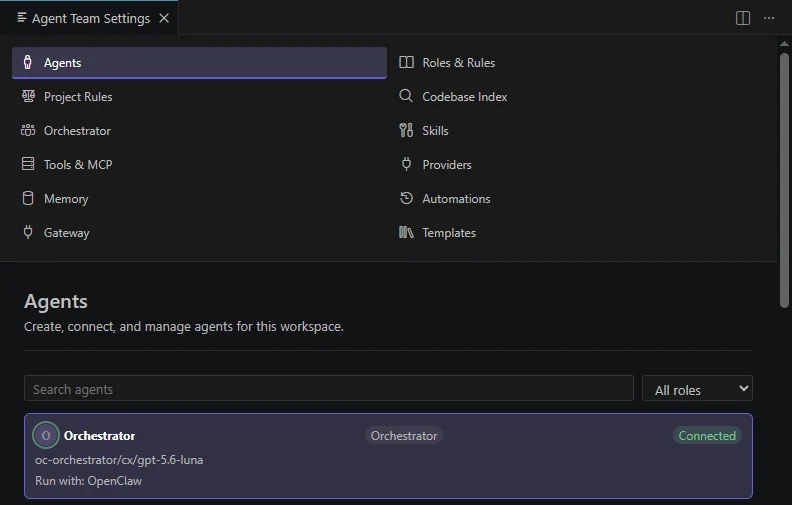
Agent Team Settings listing Agents, Roles & Rules, Tools & MCP, Memory and Gateway, with the Orchestrator agent shown as Connected.
Templates · SE Team
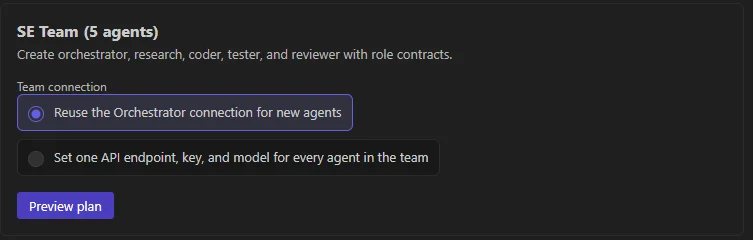
SE Team (5 agents) template with the option to reuse the Orchestrator connection and a Preview plan button.

See what each agent is doing, and step in

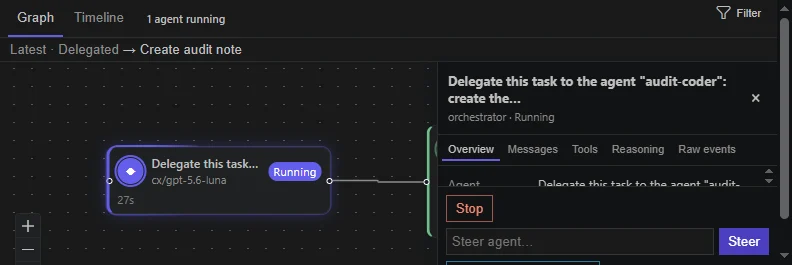
Every delegation is a node. Click one to see that agent's messages, tool calls, reasoning and raw events. If an agent heads the wrong way, press Stop, or type into Steer while it is still running.

  • Graph and Timeline views per round, with replanning
  • A managed worktree per agent, with Review, Apply and Cleanup
  • Chat sessions persist across IDE restarts
Delegated → Create audit note
A running node in the Workflow panel next to a detail pane with Overview, Messages, Tools, Reasoning and Raw events tabs, a Stop button and a Steer agent field.

Agents ask before they change files or run commands

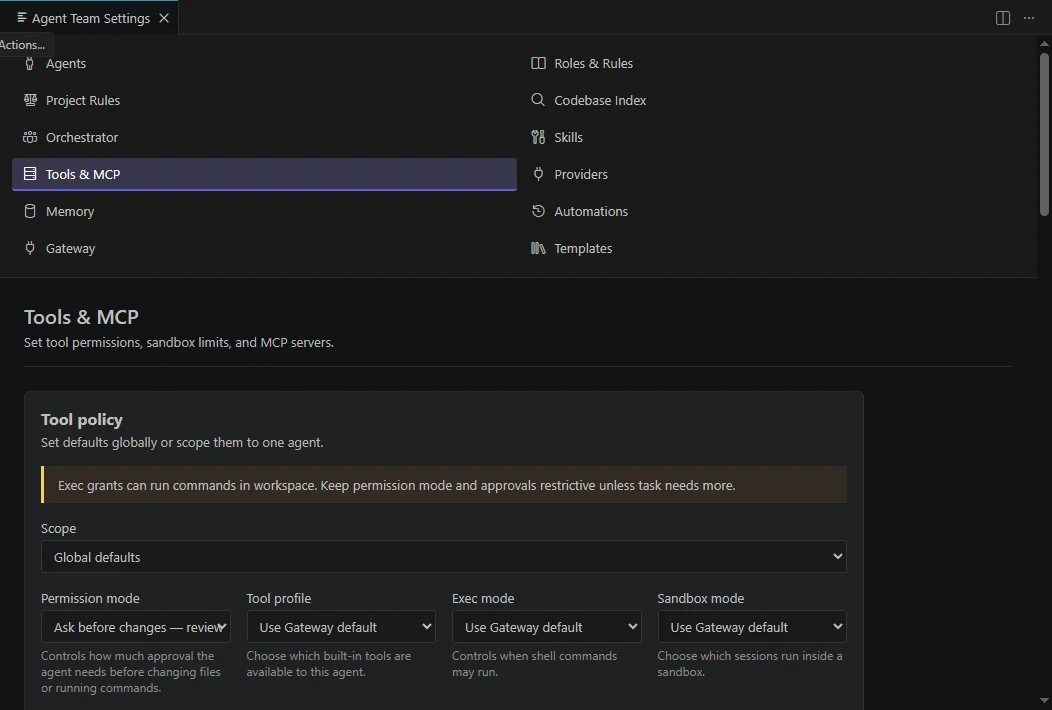
Tool permissions are enforced by the Gateway, not by the prompt. Set defaults for the whole workspace or limit a single agent, along with its sandbox and MCP servers: read only, ask before changes, workspace changes, or full access.

  • Localhost only: the Gateway listens on 127.0.0.1 on a port assigned at each launch
  • Per-launch token passed through the child process environment, never in arguments or logs
  • No silent updates: the core extension ships inside the installer
Agent Team Settings · Tools & MCP
Tool policy section with Scope, Permission mode, Tool profile, Exec mode and Sandbox mode controls.

Building on Claude

Claude as the reasoning layer of ATO.

We are bringing AI into the core of both products, with Claude as our primary model.

Natural-language flow authoring

Describe a task in Vietnamese or English and Claude drafts the workflow: picks node types, wires branches and fills parameters, then validates the flow before a human applies it.

Agentic execution

Claude with tool use runs inside workflows to read, classify and act on documents and data, replacing brittle scripted rules.

Run summaries & failure diagnosis

Claude explains what happened in a run from its logs and suggests a fix for the failing node.

Agent Team IDE

Claude models power the Orchestrator and specialist agents, and agents can also run through Claude Code as a CLI agent.

About us

Make task automation accessible and affordable.

Many operations teams in Vietnam still run their day on manual, copy-paste processes across many machines: browsers, Windows apps, Android phones and internal web tools. Our mission is to let them define a workflow once, run it reliably everywhere, watch it live and pay only for what they use.

Company
ATO — Automated Task Optimization
Founder
Võ Giang Hà
Based in
Vietnam
Email
founder@ato.io.vn
Website
ato.io.vn
Products
ATO Workflow App (live), Agent Team IDE (coming soon)

Work with us

Partnerships, investment or product questions: we would love to hear from you.